Mobile Print - PrinterShare
5.0
١٠ مليونتنزيل
1.75 ميجابايتالحجم
موقّع وموثوق
لقطات الشاشة
عن التطبيق
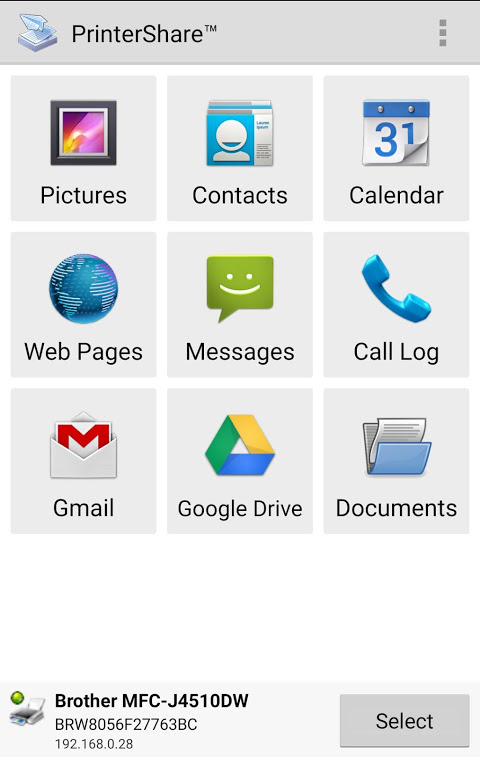
Print directly from Android phone or tablet to almost any printer! Print photos, emails, documents (including PDF, Microsoft® Word, Excel®, PowerPoint® and other files), bills, invoices, messages, web pages and more. PrinterShare makes printing easy and convenient whether your printer is right next to you or across the world!
IMPORTANT: Some of the features are NOT FREE! To unlock these features, you would need to purchase and install the PrinterShare Premium Key app, a stand-alone tiny application that simply needs to be installed on the device to unlock the Premium Features of the free app.
We highly recommend printing the test page to ensure compatibility with your printer prior to purchasing the Premium Key.
NOTE: Unfortunately, we had to remove the SMS and Call log printing features from our app due to the update to the Permissions policy on Google Play. Dear customers, we are as much upset by this issue as you are. And we are doing our best to resolve the issue.
For this reason please stay tuned to the app updates. Once we obtain the necessary Messages and Call log permissions from Google, we are planning to bring the features back to the app.
With PrinterShare you can easily print images and photos (JPG, PNG, GIF), emails (from Gmail) and attachments (PDF, DOC, XLS, PPT, TXT), contacts, agenda, web pages (HTML) and other digital content from device memory, cloud storage providers such as Google Drive, One Drive, Box, Dropbox and other applications using Share action. You even can print text messages for trial or legal matters!
Print UPS shipping labels directly from a browser on Android device to supported thermal printers by logging to UPS website.
Also, you can configure many printing options such as paper size, page orientation, copies, page range, one- or two-sided printing (duplex mode), print quality (resolution), color or monochrome, media tray and more.
With the free version of the app, you can:
* Print with certain restrictions on nearby wireless (WiFi, Bluetooth) and direct USB OTG connected printers;
* Print on Windows shared (SMB/CIFS) or Mac shared printers;
* Print via Google Cloud Print (including Save as PDF);
* Print 20 pages in the remote mode over the Internet.
For unlimited printing, you would need to have the PrinterShare Premium Key app installed on your mobile device.
Premium Features include:
* Unlimited Nearby direct printing (PDFs, documents, photos and more) via Wi-Fi or Bluetooth without a computer;
* Unlimited Remote printing. The receiving end (Windows or Mac) would not have to buy pages or subscribe.
PrinterShare supports a wide variety of HP, Canon, Brother, Kodak, Samsung, Dell, Ricoh, Lexmark, Kyocera, OKI and other printers including legacy networkable. A full list of supported printers available at http://printershare.com/help-mobile-supported.sdf. You can also print to unsupported and legacy printers with our free computer software for Mac and Windows available at http://printershare.com.
Here is the list of printers supported by PrinterShare app:
http://www.printershare.com/help-mobile-supported.sdf
Make sure that your printer is supported.
Please note:
1) Requested permissions are needed to print content and are not used to collect your personal data. For a more detailed explanation please see our FAQ at http://www.printershare.com/help-mobile-faq.sdf
2) Google Cloud Print requires the latest version of Chrome browser on your computer or Google Cloud Print capable printer. For more setup instructions please read http://www.google.com/support/cloudprint/
3) If something isn't working as expected, please send us an email to support@printershare.com
Have a good print!
P.S. For direct nearby printing to selected printer models PrinterShare downloads and uses drivers provided by HPLIP (http://hplipopensource.com) and GutenPrint (http://gimp-print.sourceforge.net). These drivers are distributed under GNU General Public License, version 2.
يمكنك الطباعة مباشرة من هاتف Android أو الجهاز اللوحي إلى أي طابعة تقريبًا! طباعة الصور ورسائل البريد الإلكتروني والمستندات (بما في ذلك PDF و Microsoft® Word و Excel® و PowerPoint® وملفات أخرى) والفواتير والفواتير والرسائل وصفحات الويب والمزيد. يجعل PrinterShare الطباعة أمرًا سهلاً ومريحًا سواء كانت طابعتك مباشرة أو في جميع أنحاء العالم!
هام: بعض الميزات ليست مجانية! لإلغاء قفل هذه الميزات ، ستحتاج إلى شراء وتثبيت تطبيق PrintShare Premium Key ، وهو تطبيق صغير مستقل يحتاج ببساطة إلى تثبيته على الجهاز لإلغاء قفل الميزات المميزة للتطبيق المجاني.
نوصي بشدة بطباعة صفحة الاختبار لضمان التوافق مع طابعتك قبل شراء مفتاح Premium.
ملاحظة: للأسف ، كان علينا إزالة ميزات طباعة سجل SMS و Call من تطبيقنا بسبب التحديث إلى سياسة الأذونات على Google Play. أيها العملاء الأعزاء ، نحن مستاءون من هذه المشكلة كما أنت. ونحن نبذل قصارى جهدنا لحل المشكلة.
لهذا السبب ، يرجى متابعة تحديثات التطبيق. بعد الحصول على أذونات سجل الرسائل والمكالمات الضرورية من Google ، نخطط لإعادة الميزات إلى التطبيق.
مع PrinterShare يمكنك طباعة الصور والصور بسهولة (JPG و PNG و GIF) ورسائل البريد الإلكتروني (من Gmail) والمرفقات (PDF و DOC و XLS و PPT و TXT) وجهات الاتصال وجدول الأعمال وصفحات الويب (HTML) والمحتويات الرقمية الأخرى من ذاكرة الجهاز وموفري التخزين السحابي مثل Google Drive و One Drive و Box و Dropbox والتطبيقات الأخرى باستخدام إجراء المشاركة. يمكنك حتى طباعة الرسائل النصية للمحاكمة أو المسائل القانونية!
اطبع بطاقات شحن UPS مباشرة من متصفح على جهاز Android إلى الطابعات الحرارية المدعومة عن طريق تسجيل الدخول إلى موقع UPS على الويب.
كذلك ، يمكنك تكوين العديد من خيارات الطباعة مثل حجم الورق ، اتجاه الصفحة ، النسخ ، نطاق الصفحات ، الطباعة على الوجهين أو على الوجهين (جودة الطباعة على الوجهين) ، جودة الطباعة (الدقة) ، اللون أو أحادي اللون ، علبة الوسائط والمزيد.
مع الإصدار المجاني من التطبيق ، يمكنك:
* الطباعة مع بعض القيود على الشبكات اللاسلكية القريبة (WiFi ، Bluetooth) والطابعات المتصلة عبر USB OTG ؛
* الطباعة على Windows المشتركة (SMB / CIFS) أو الطابعات المشتركة لنظام التشغيل Mac ؛
* الطباعة عبر Google Cloud Print (بما في ذلك حفظ بتنسيق PDF) ؛
* طباعة 20 صفحة في وضع بعيد عبر الإنترنت.
بالنسبة للطباعة غير المحدودة ، ستحتاج إلى تثبيت تطبيق PrinterShare Premium Key على جهازك المحمول.
تشمل المزايا المميزة ما يلي:
* طباعة مباشرة غير محدودة في الجوار (ملفات PDF ومستندات وصور وغيرها) عبر Wi-Fi أو Bluetooth بدون جهاز كمبيوتر ؛
* غير محدود الطباعة عن بعد. لن يتعين على الطرف المستقبل (Windows أو Mac) شراء الصفحات أو الاشتراك.
تدعم PrinterShare مجموعة كبيرة من HP و Canon و Brother و Kodak و Samsung و Dell و Ricoh و Lexmark و Kyocera و OKI والطابعات الأخرى بما في ذلك الشبكات القديمة القابلة للتواصل. قائمة كاملة من الطابعات المدعومة متاحة على http://printershare.com/help-mobile-supported.sdf. يمكنك أيضًا الطباعة إلى الطابعات القديمة غير المدعومة مع برامج الكمبيوتر المجانية الخاصة بـ Mac و Windows المتوفرة على http://printershare.com.
فيما يلي قائمة الطابعات التي يدعمها تطبيق PrinterShare:
http://www.printershare.com/help-mobile-supported.sdf
تأكد من أن طابعتك مدعومة.
يرجى الملاحظة:
1) هناك حاجة للأذونات المطلوبة لطباعة المحتوى ولا يتم استخدامها لجمع بياناتك الشخصية. للحصول على شرح أكثر تفصيلاً ، يرجى الاطلاع على الأسئلة الشائعة على http://www.printershare.com/help-mobile-faq.sdf
2) تتطلب خدمة "طباعة في السحاب من Google" أحدث إصدار من متصفح Chrome على جهاز الكمبيوتر الخاص بك أو طابعة قادرة على الطباعة في السحاب من Google. لمزيد من إرشادات الإعداد ، يرجى قراءة http://www.google.com/support/cloudprint/
3) إذا كان هناك شيء لا يعمل كما هو متوقع ، يرجى إرسال بريد إلكتروني إلى support@printershare.com
لديك طباعة جيدة!
ملاحظة بالنسبة للطباعة المباشرة القريبة لطرازات الطابعة المحددة ، تقوم تنزيلات PrinterShare باستخدام برامج التشغيل التي توفرها HPLIP (http://hplipopensource.com) و GutenPrint (http://gimp-print.sourceforge.net). يتم توزيع برامج التشغيل هذه تحت رخصة جنو العمومية العامة ، الإصدار 2.
معلومات إضافية
تاريخ التحديث
2026-10-10الإصدار
11.24.0الحجم
1.75 ميجابايتالمطور
Mobile Dynamixandroid-support@fb.com
تصنيف المحتوى
Everyoneالحزمة
com.dynamixsoftware.printershareالتوقيع (MD5)
74bc472a9d47867f68cc45d4f47cd969