لقطات الشاشة
عن التطبيق
GPlayer
█ Free Android Video Player even you don’t want the floating popup features.
█ Why do you choose the software as your media player ?
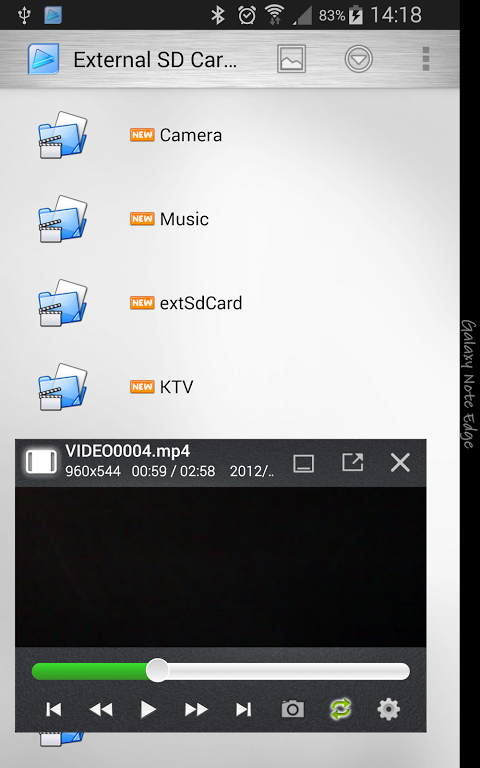
☆ Multiple-Window & Floating Pop-up Technique; You can play the video in anywhere, for multiple windows.
☆ Simple & Customize Theme Style System; You can make your own theme in a easy way.
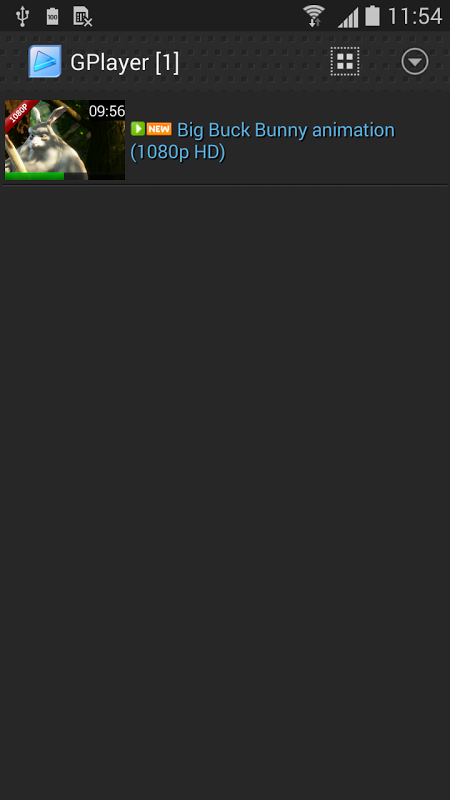
☆ Easy Operation and User Interface; View your media in list, grid, and 3D Gallery mode, play the video with simple gesture to adjust. You can also use the widgets to play the video from the launcher.
☆ Wide Video Format Support; You can play almost all types of the media files with software decoder with subtitle files, like the rmvb, wmv, …etc. It also support to play the YouTube (HTML5) and URL.
☆ Group Media Sharing; You can share the media with your friends in a high speed wireless channel without any configuration.
☆ Personalize List; You can mark the selected media with favorite or privacy, it only shows in the mirror list.
☆ Performance and Reliability Improve; Better performance in the loading and playing. For the large amount of video files, its loading time is more fast compared to the others video player.
█ Introduction
The GPlayer is an innovation video playback software for Android OS. It can re-size, move window, multi-windows play-back with Group Media Sharing feature. Better operation experience, support subtitle and popup video technique. In other words, you can watch your video content in any application. You can watch the video and do something else at the same time!
█ Description
The floating system make you can move the video window position and resize the window boundary according to your personal favor. You can also play with full screen or minimize the playing video to the system notification tray . If your device is strong enough, you can also play the video with "Multi-Window"(Maximum is 6). It means you can watch up to six video files at the same time.
The "GPlayer" is not just a popup video player, it has a friendly and simply user interface with List style, Grid style and 3D Gallery Flow style. You can customize the theme as your wish.
It can record the playback position of the file and set the favorite files. Moreover, it supports the subtitle (.srt, .ass, and .smi file formats) when you play a video file. it also can play the audio files (mp3, wav...etc).
Group Media Sharing allows the devices with the same network mask to share the media files. In other words, you can share the media contents with your friends in the same Wi-Fi environment (Wi-Fi Access Point). You can also try the "Sync Play" feature, it is very funny.
The "GPlayer" supports from Android 1.5 ~ 4.2 with any screen size and resolution. It will integrate the build-in media Gallery for media source, you can input the video streaming URL or launch the "GPlayer" from others File Explorer..
█ How to use the application ?
Please read the help in the “menu” -> “Settings” -> “User Manual” in the software.
█ Free Edition
The software is a free edition; some features are only available in Professional edition. If you like the software, you can buy the Professional edition license via Google Play in-app purchase to support our development.
</div> <div jsname="WJz9Hc" style="display:none">GPlayer
█ الحرة الروبوت فيديو لاعب حتى كنت لا تريد الميزات المنبثقة العائمة.
█ لماذا اخترت البرمجيات وسائل الاعلام الخاصة بك لاعب؟
☆ متعددة شبابيك العائمة المنبثقة تقنية. يمكنك تشغيل الفيديو في أي مكان، لنوافذ متعددة.
☆ بسيط وتخصيص نظام موضوع نمط. يمكنك جعل موضوع خاص بك بطريقة سهلة.
☆ عملية سهلة واجهة المستخدم. عرض وسائل الاعلام الخاصة بك في القائمة، الشبكة، ووضع معرض 3D، تشغيل الفيديو مع لفتة بسيطة لضبط. يمكنك أيضا استخدام الحاجيات لتشغيل الفيديو من قاذفة.
☆ على نطاق واسع تنسيق دعم الفيديو. يمكن أن تقوم به تقريبا جميع أنواع ملفات الوسائط مع فك ترميز البرامج مع ملفات الترجمة، مثل RMVB، WMV، ... الخ. انها تدعم أيضا للعب يوتيوب (HTML5) وURL.
☆ المجموعة مشاركة الوسائط. يمكنك مشاركة وسائل الإعلام مع أصدقائك في قناة لاسلكية عالية السرعة ودون أي تكوين.
☆ قائمة تخصيص. يمكنك وضع علامة على الوسيط المختار مع المفضلة أو الخصوصية، فإنه يظهر فقط في قائمة المرآة.
☆ الأداء والموثوقية تحسين. أداء أفضل في التحميل واللعب. لكمية كبيرة من ملفات الفيديو، ووقت التحميل منه هو أكثر سرعة مقارنة مع مشغل فيديو الآخرين.
█ مقدمة
وGPlayer بدعة الفيديو تشغيل البرمجيات لنظام تشغيل الروبوت. ويمكن أن إعادة حجم، نافذة الخطوة، ونوافذ متعددة لعب الظهير مع ميزة مشاركة الوسائط المجموعة. خبرة عملية أفضل، العنوان الفرعي الدعم وتقنية منبثقة الفيديو. وبعبارة أخرى، يمكنك مشاهدة محتوى الفيديو الخاصة بك في أي تطبيق. يمكنك مشاهدة الفيديو وتفعل شيئا آخر في نفس الوقت!
█ الوصف
نظام العائمة تجعلك يمكن ان تتحرك موقف نافذة الفيديو وتغيير حجم نافذة الحدود وفقا لصالح الشخصية. يمكنك أيضا أن تلعب مع كامل الشاشة أو تقليل لعب الفيديو إلى علبة الإخطار النظام. إذا كان جهازك قوي بما فيه الكفاية، يمكنك أيضا تشغيل الفيديو مع "متعدد النافذة" (الحد الأقصى 6). فهذا يعني أنك يمكن مشاهدة ما يصل إلى ستة ملفات الفيديو في نفس الوقت.
و"GPlayer" ليس مجرد لاعب المنبثقة الفيديو، لديه واجهة المستخدم ودية وببساطة مع نمط قائمة، على غرار الشبكة وأسلوب 3D معرض التدفق. يمكنك تخصيص موضوع كما رغبتكم.
فإنه يمكن تسجيل موقف تشغيل الملف وضبط الملفات المفضلة لديك. وعلاوة على ذلك، فإنه يدعم العنوان الفرعي (. الصربية، .ass، وتنسيقات الملفات .smi) عند تشغيل ملف الفيديو. فإنه يمكن أيضا تشغيل الملفات الصوتية (MP3، WAV ... الخ).
مجموعة مشاركة الوسائط يسمح للأجهزة مع نفس قناع شبكة لتبادل ملفات الوسائط. وبعبارة أخرى، يمكنك مشاركة محتويات وسائل الإعلام مع أصدقائك في بيئة واي فاي نفس (واي فاي نقطة وصول). يمكنك أيضا محاولة ميزة "مزامنة اللعب"، فمن مضحك جدا.
و"GPlayer" تدعم من أندرويد 1.5 ~ 4.2 مع أي حجم الشاشة والقرار. وسوف تدمج البناء في وسائل الإعلام معرض لمصدر إعلامي، يمكنك إدخال URL الفيديو المتدفقة أو إطلاق "GPlayer" من الآخرين ملف اكسبلورر ..
█ كيفية استخدام التطبيق؟
يرجى قراءة التعليمات في "القائمة" -> "إعدادات" -> "دليل المستخدم" في البرنامج.
█ الطبعة الحرة
البرنامج هو نسخة مجانية. متوفرة فقط في الطبعة الفنية بعض الميزات. إذا كنت ترغب في البرنامج، يمكنك شراء رخصة المحترف عبر جوجل لعب في التطبيق شراء لدعم التنمية لدينا.</div> <div class="show-more-end">
معلومات إضافية
تاريخ التحديث
2018-05-04الإصدار
1.9.6الحجم
19.9 ميجابايتالمطور
تصنيف المحتوى
Everyoneالحزمة
gpc.myweb.hinet.net.PopupVideoالتوقيع (MD5)
d9ab0fefc4c905b8953da70535de84b2